Amazon shipment tracking · FBA receiving times
Amazon FBA Shipment Delays — How Long Does It Really Take?
Struggling with delayed FBA shipments?
Track how long Amazon takes to receive your inventory and get a clearer picture of your stock timelines.
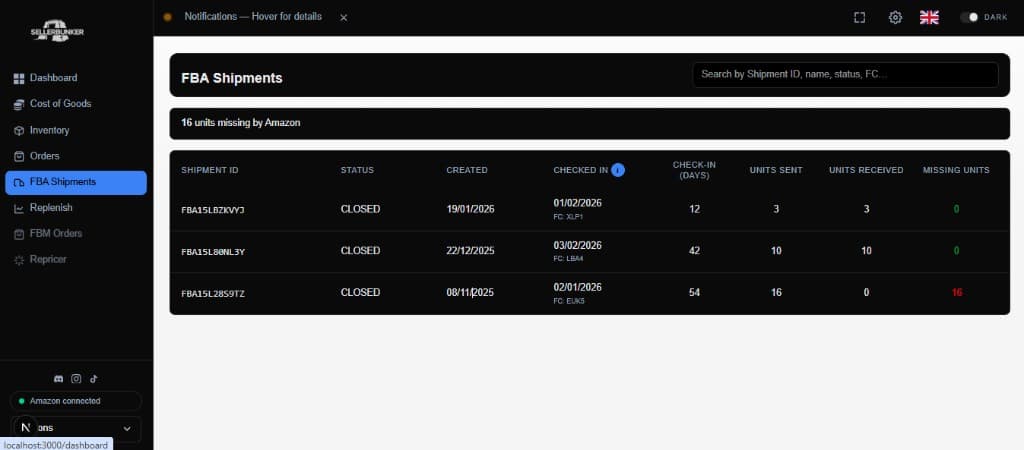
Amazon FBA shipment delays are one of the most common issues sellers face.
Whether your inventory is stuck in “receiving” or taking longer than expected to become available, understanding FBA processing times is critical for managing stock and cash flow.
This page helps you understand how long Amazon typically takes to receive shipments — and how to track delays more effectively.
Why Are Your FBA Shipments Delayed?
Amazon doesn’t always receive inventory immediately after delivery.
Common causes of FBA shipment delays include:
- Warehouse congestion
- Seasonal spikes (Q4, Prime events)
- Staffing shortages
- Split shipments across multiple fulfilment centres
- Manual checks or discrepancies
This means your stock can sit in “receiving” for days — or even weeks.
Typical Amazon FBA Receiving Times
In most cases:
- Small parcel deliveries: 2-5 days
- Larger shipments / pallets: 5-10+ days
- Peak periods: 10-20+ days
However, these are only estimates — actual times can vary significantly.
Without tracking, it’s hard to know if your shipment is delayed or just slow.
FBA Delays Can Impact Your Business More Than You Think
When your inventory is delayed:
- You go out of stock
- You lose sales and ranking
- Your cash flow slows down
- You can’t reinvest in new inventory
Even a few days of delay can significantly affect performance.
The Hard Part: Knowing What’s “Normal”
Amazon doesn’t make it easy to track receiving performance over time.
You might see:
- “Delivered”
- “Receiving”
- “Checked-in”
But you don’t get:
- Clear timelines
- Historical averages
- Benchmark data
So it’s hard to know when something is actually wrong.
Track Your FBA Shipment Timelines More Clearly
SellerBunker helps you get a clearer view of your shipments by:
- Tracking when shipments are sent and received
- Helping you understand typical receiving times
- Giving you better visibility into delays across your inventory
This allows you to:
- Spot slow shipments earlier
- Plan stock more effectively
- Reduce uncertainty around inventory
Example FBA Shipment Timeline
- Day 0: Shipment delivered
- Day 2: Receiving starts
- Day 5: Partially checked in
- Day 8: Fully available
Without tracking, this can feel like a delay — even if it’s normal.
FAQ
What causes Amazon FBA shipment delays?
Delays are usually caused by warehouse congestion, high volume periods, or processing backlogs.
How long should FBA receiving take?
Typically 2-5 days for small shipments, but this can extend to 10+ days during busy periods.
When should I be concerned about a delay?
If your shipment has been in “receiving” for more than 7-10 days, it may be worth investigating.
Can you speed up Amazon receiving?
No — but you can plan better by understanding average timelines and delays.
Built by active Amazon sellers who deal with FBA delays daily.